

One Year Shooting the Panasonic Lumix GH4 Review. My how time flies when you’re having fun, and fun is what I’ve had since purchasing the first of my two Panasonic Lumix GH4’s back in April of 2014. As usual, this post is not a technically in-depth review of the GH4 but rather a real life description of how these cameras have performed over this past year. Since receiving my first GH4 I’ve shot nearly 200,000 images through two separate bodies. They’ve been everywhere from Antarctica to Africa, Costa Rica to Alaska, Romania to Japan, in winter, summer, fall, and spring, being splashed on, dropped, and covered in African dust. You get the picture; no pun intended. Through thick and thin these two cameras have kept cranking the pictures out, and I thought I would share with you my thoughts and observations about Panasonic’s most capable, professional quality camera, the Lumix GH4.
My last in-depth review of the GH4’s predecessor the GH3, first appeared here on the Corkboard Blog on March 6th. 2014. I plan to follow the outline I did for the GH3 for this review of the GH4. It will deviate a bit however since the GH4 has many more features.
THINGS I LOVE ABOUT THE GH4
Size and Weight
Without a doubt, my number one attraction to Panasonic’s Micro Four Thirds mirrorless cameras is their small size and weight. I’ve been shooting pictures professionally for over 30 years, and I’ve become weary of large cumbersome bodies, lenses, and additional accessories.

 The Canon 600mm F/4 with photographer attached is on the left. On the right is me shooting the Lumix GH3 with a 100-300mm F/4-5.6 lens. In the Micro Four Thirds world, all lenses are multiplied by two, so the Lumix 100-300mm is actually equivalent to a 200-600mm, the same long magnification as the massive Canon lens.
The Lumix GF1 was the first camera I found that was small, had interchangeable lenses, and a large enough sensor to produce extremely high quality photos. I tell people all the time that photography is supposed to be fun. If traveling with so much gear becomes painful, that reduces the fun factor, and I’m all about having a good time with photography at this point in my career. I’m not unique. I hear from many of our NE Explorers they are tired of the large heavy equipment. The Panasonic Lumix Micro Four Thirds cameras are making photography fun again.
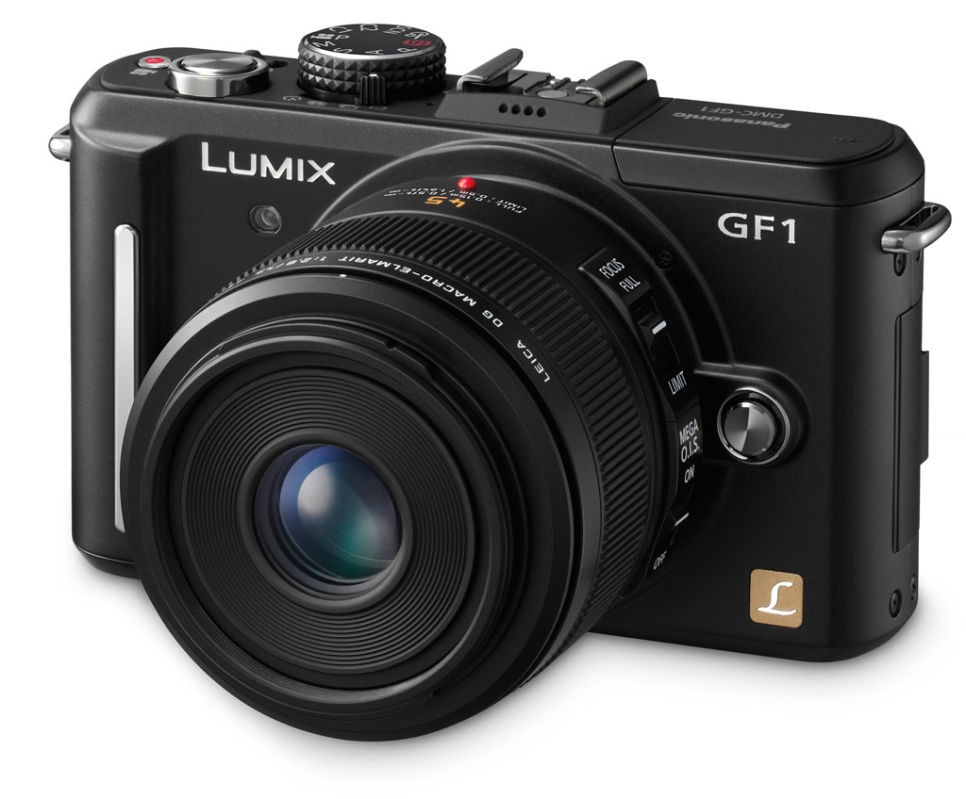
 This is the original MFT camera that started the whole transition for me. It’s the Lumix GF1, an interchangeable MFT camera with an attached 42.5 macro lens. Photo courtesy of Imaging-Resource.com
Keep in mind that there are numerous mirrorless cameras out there and many of them are amazing in their own right. The new Sony full frame cameras are very tempting, but with a full frame sensor comes big bulky lenses. When Panasonic and Olympus first created the Micro Fourth Thirds consortium, they did so knowing full well there would be some compromises to a system with a smaller sized digital sensor. But they also knew there would be many benefits. One of the major benefits of a smaller sensor is the ability to build smaller, lighter lenses and bodies. The physical characteristics of optics can be reduced when coupled to a smaller, digital sensor.
Although there are many mirrorless cameras on the horizon, I currently feel the Micro Four Thirds group of cameras, with their smaller sensors, have allowed Olympus and Panasonic to hit THE sweet spot in relation to the sensor size and lens combinations. The Micro Four Thirds sensor allows for very high quality images with lenses that are much smaller and lighter than say, the full sized sensors in the new Sony A7 mirrorless cameras. The biggest contributor to size and weight of traditional full frame cameras has been the lenses.
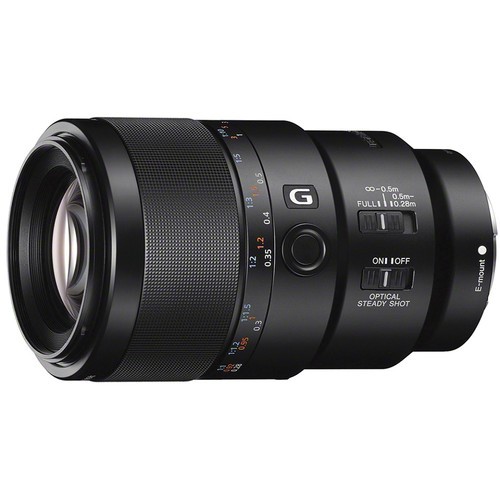
 Sony FE 90mm f/2.8 Macro G OSS Lens. costs $1100 and weighs 1.32 lb (602 grams)
If the lenses have to stay the same size and weight due to a full frame sensor, we’ve now negated the benefits of a smaller, lighter mirrorless body. As I’m writing this I’m thinking of Sony’s brand new macro lens that was recently announced for the mirrorless A7 series camera. Its official name and specs are the Sony FE 90mm f/2.8 Macro G OSS. It weighs a staggering 1.32 lb (602 g) and is available on pre-order on B&H for $1098.
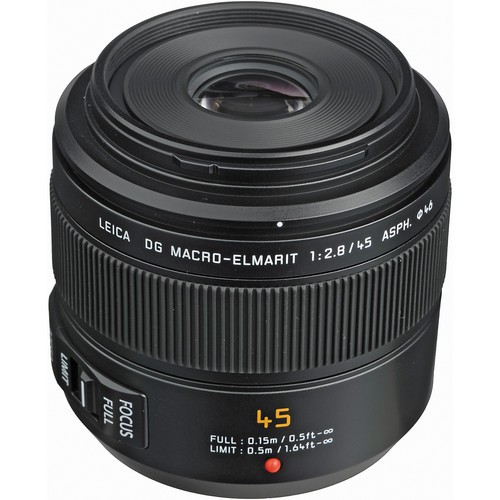
 Panasonic Leica DG Macro-Elmarit 45mm f/2.8 ASPH. MEGA O.I.S. weighs 7.94 oz (225 g) at a price of $900
Now lets compare that to the Lumix version which is the Panasonic Leica DG Macro-Elmarit 45mm f/2.8 ASPH. MEGA O.I.S. It weights a measly 7.94 oz (225 g) and is also selling on the B&H website, for $896. The Panasonic Leica macro is not inexpensive for a much smaller, lighter lens but then the Leica glass is a tremendous bonus.
Fabulous Ergonomics – Superb placement of WB, ISO, and +/- Buttons
Overall, these buttons are well placed which makes their operations extremely efficient. These three controls are options I use every time I pick the camera up. Nobody in the camera business today has thought about the location and use of these buttons better than what I’ve experienced on the GH3 and GH4. Yes, these buttons are still the same as found on the Lumix GH3.
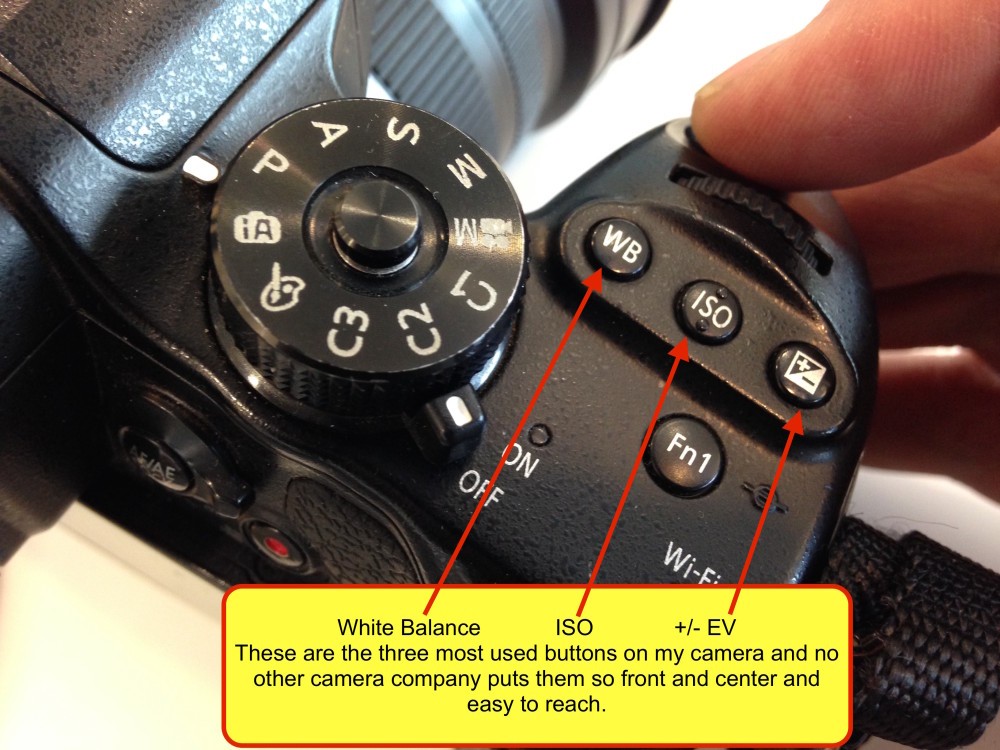
 The Lumix GH4, and even the earlier GH3, are the easiest cameras to use I have ever shot. These three buttons are something I use constantly, and nobody else places them in such an obvious and convenient place. Each can be used with the camera to your eye, during the shooting process, with one hand operation. NOBODY does this better and these three tools are extremely important features.
Thankfully, we have a camera company that got it right and made the decision not to fiddle with near perfection. This would be a different story had they not done such a good job on the GH3, but the placement of the WB, ISO and +/- buttons are the best of any camera I’ve ever shot including my current Nikons as well as Canon, Sony, AND the Olympus OM-D EM-1.
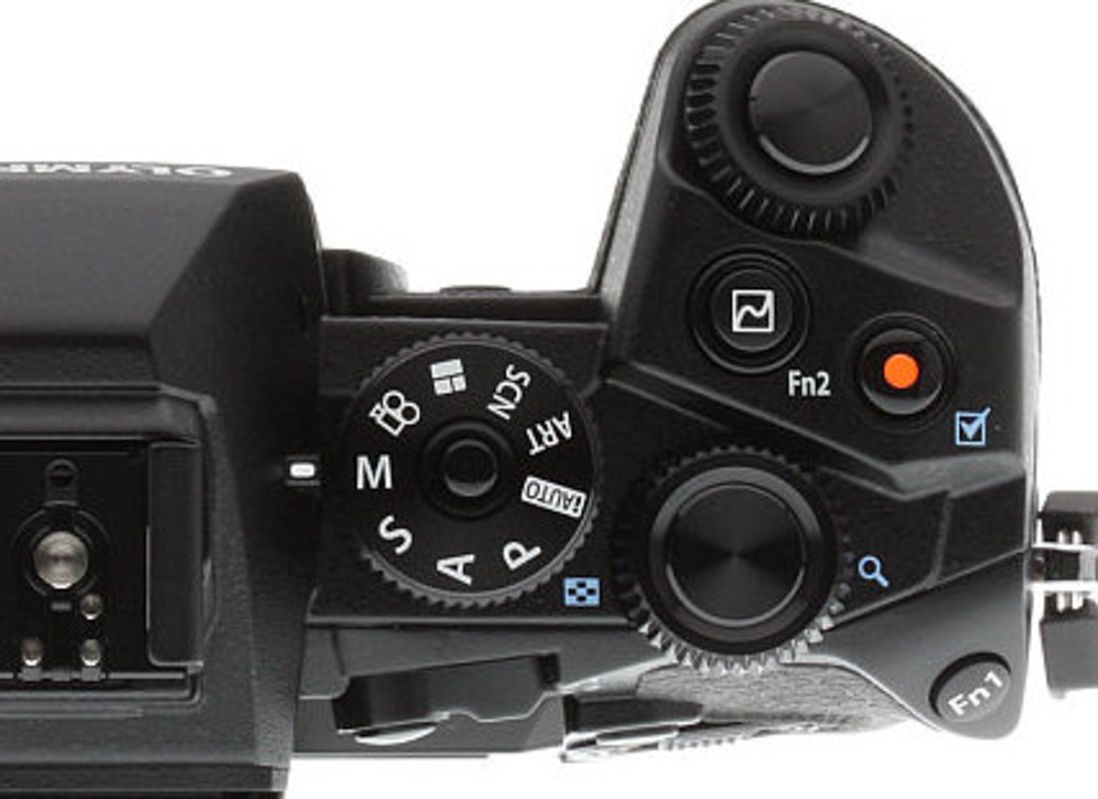
 Try what I call the “Ease of Use Test.” Can you figure out where the WB, ISO and +/- EV options are on this Olympus OM-D EM-1? Give you a hint, they are not on the back side of the camera. Compare this to the image above of the GH4 and tell me which one you could pull off the shelf and use right out of the box with little or no support from the manual.
In my blog post titled One Year Testing the Panasonic Lumix GH3 I mentioned that I thought Panasonic could and should have moved these buttons forward, closer to the shutter button and in turn moved the front control dial down below the shutter button, identical to the setup Nikon uses. I feel the same about these buttons on the GH4. Placing the WB, ISO and +/-EV button in the same place as the Front Dial, then moving the dial forward and below the shutter button, would make reaching these three buttons even easier. This is a bit of a niggly complaint, but I do believe it would make them even more accessible and easy to use.
On/Off Switch
This sounds like a simple thing, but it’s amazing how many camera companies try to reinvent the wheel with their placement of the on/off switch. The Olympus OM-1D is a case in point. Why put the on/off switch on the left, top side? When you pick up the GH4, the ON switch is on the right, top deck, in easy reach of your right thumb using one-handed operation. On the Olympus you actually need two hands on the camera. This reminds me of Canon and their reinvention of the on/off switch that is placed on the upper left corner of the top deck on some models and lower right corner of the body on others. Why? Is it easier and more convenient than what Nikon and Panasonic have done? I don’t think so. When camera makers change some of these controls, it’s as if they are fiddling with things just to be different. That’s what I like about the GH4, the controls are very logical and well thought out, as were the GH3’s. Panasonic hasn’t changed things that don’t need changing. When things work well, leave them alone like an on/off switch at top side right where your thumb can reach it. Nice job Lumix.
Battery Grip
The additional battery grip on the GH4 is a superb addition and amazingly it’s the same one I was using on my GH3’s. I love the small size and compactness of the GH4, but sometimes I want a bit more to hold on to, especially when shooting the Lumix Vario 100-300mm or the Olympus 40-150mm F/2.8. Panasonic has replicated, on the battery grip, the well thought out WB, ISO and +/- buttons that are so conveniently placed on the camera.
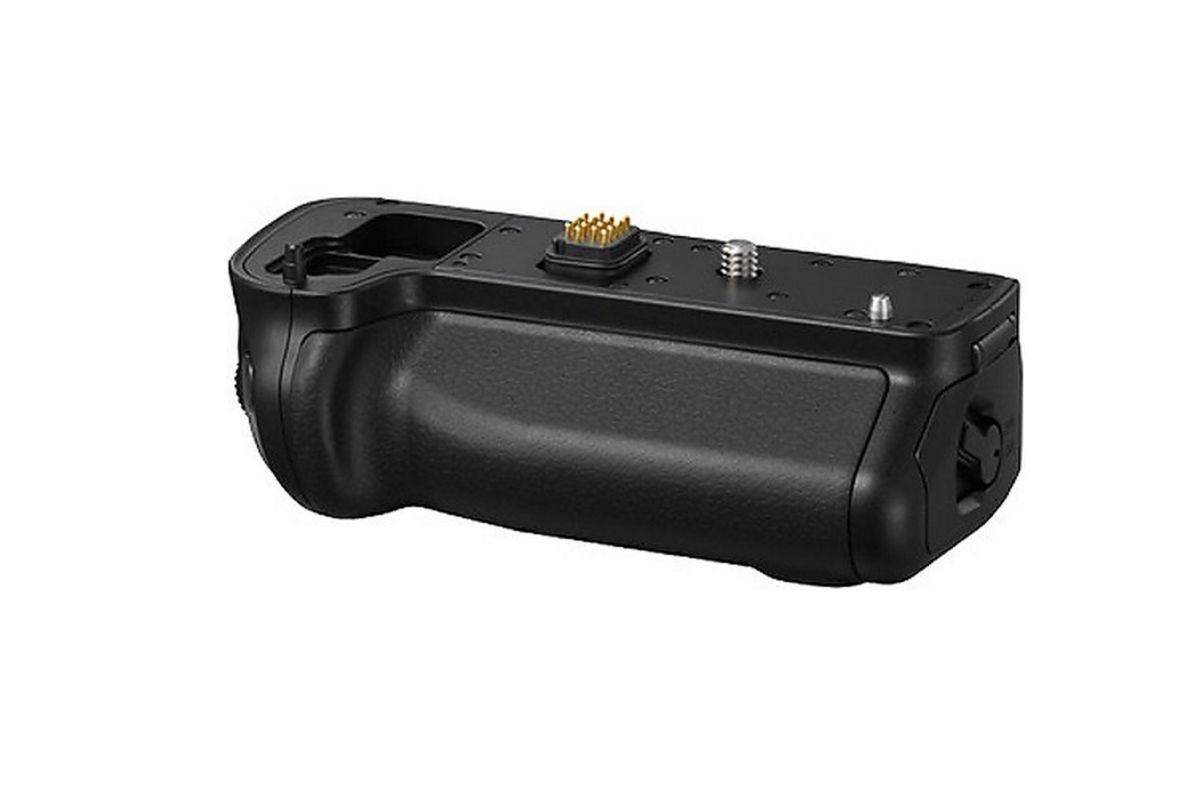
 Same battery grips work on both the GH3 and GH4.
The grip also includes the AF/AE lock button which I often change to Auto Focus start. My only gripe with the extra battery pack is the fact the additional battery compartment takes the same size battery as the camera. The good news is you get two batteries, one in the camera and one in the grip. However, I would love to see Panasonic give us a longer lasting, more professional-sized battery placed in the battery compartment of the add on grip. Nikon has a larger battery option and their bigger batteries last for 3-4 days. Currently I have to charge my GH4 batteries each night after a full day’s use.
External Flash FL360L and FL580l LCD Video Light
One of the major features on all Lumix cameras is the ability to produce professional quality video. Often when shooting videos I’m required to shoot so called talking heads, interviews, etc.
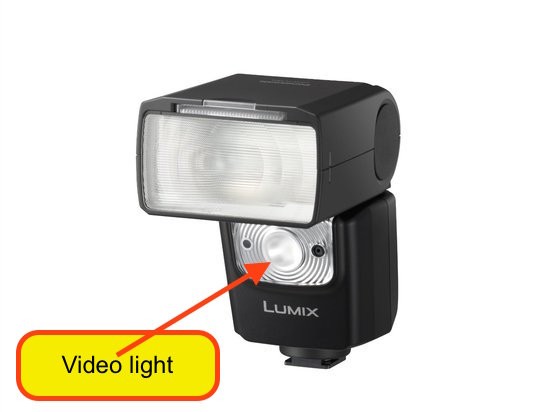
 Fl560L with built-in video light. This strobe also has wireless connection options to Lumix cameras.
Panasonic has built into the FL360L flash a relatively bright LED light for video production. It’s not going to illuminate a room, but it does an adequate job in interview situations where a small amount of quality light is needed for recording a conversation like the video below with Dr. Steven Amstrup.
It’s very nice to not have to carry additional lights for the incidental times I need added illumination for video production.
A Growing Collection of Lenses
Any camera system is only as good as the lenses available that a photographer can use with it. That’s the reason Nikon and Canon have such a huge advantage; they have many years of making high quality optics giving them both a vast array of quality options. One of the benefits of the Micro Four Thirds consortium is the brilliant idea of sharing the lens mount. Doing so immediately increased the number of lenses. Both Panasonic and Olympus knew this revolutionary idea would be the only way they could compete in a timely manner. To that end here is a list of over 60 lenses currently available for all Micro Four Thirds cameras. Some have more features than others like AF, IS, and other electronics, but they all have the ability to fit on any MFT camera without an adapter.
Even with so many lenses, I’m shooting mostly Panasonic, and I can assure you they take a backseat to nobody regarding quality glass. Last year Panasonic introduced two new lenses that have their highest quality optics and design targeted at the serious photographer. The two lenses are the 12-35mm F/2.8 and the 35-100 F/2.8. With maximum F/2.8 apertures, these lenses fall into the categories many professional and serious amateurs look for, bright and sharp.
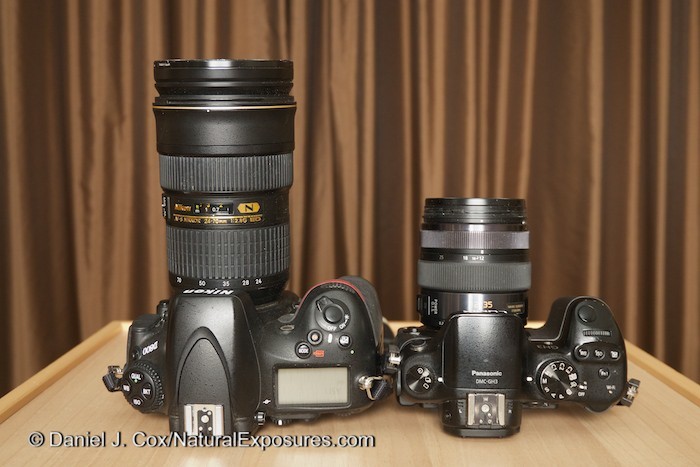
 On the left is my Nikon D800 with a 24-70mm F/2.8 lens. On the right is the Lumix GH3 with a 12-35mm F/2.8 which is the equivalent to the same lens on the Nikon.
Along with these two lenses I’m also using their Leica Nocticron 42.5mm F/1.7, the Leica Summilux 15mm F/1.7, the Lumix Vario 45mm F/2.8 Macro, as well as the 7-14mm F/4. All of these lenses are superb optics. Especially the 42.5mm Leica Nocticron. As I’ve mentioned in the past, all Micro Four Thirds lenses need to be multiplied by two to get their effective focal length. Doing so brings them up to the range of my Nikon lenses that include the 24-70mm, 70-200mm, 105mm macro, and my 12-24mm wide angle. In other words, the MFT lenses are similar optics that are much, much lighter and generally less than half the cost.
The one lens I did not mention that I only recently added to my Lumix collection is the recently released Olympus 40-150mm F/2.8. I didn’t mention it above because this amazing piece of glass stands out on its own. I haven’t been this enthused about a lens since the release of the AF version of the Nikkor 200-400mm F/4. Being able to add Olympus lenses to my Panasonic Lumix system has always been one of the benefits I’ve discussed as a huge advantage of the Micro Four Thirds consortium. Olympus lenses fit on Lumix bodies and Lumix lenses fit on Panasonic bodies. No longer do we need to change entire systems if one company comes out with a stellar lens or a new and improved camera body. Mix and match is the name of the game.
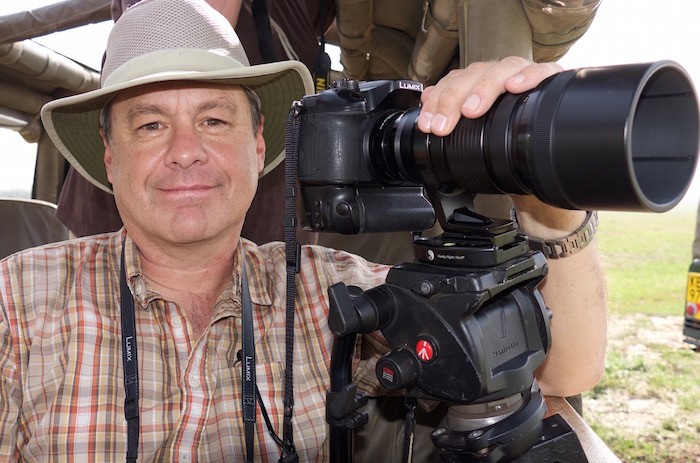
 As I said in the text, mix and match is the name of the game. Here I’m shooting a Lumix GH4 body and attached is the Olympus 40-150mm F/2.8 lens along with the Olympus 1.4 teleconverter.
Why am I so excited about the new 40-150mm F/2.8? Well along with being able to use it on my Lumix bodies, this lens is incredibly sharp. Not just in the middle but across the entire frame from left to right, top to bottom, I see no issues with any of the images I’ve shot with this lens either wide open or stopped down. It’s simply astonishing. This glowing report comes from not just a few sample images run through the GH4 but rather over 50,000 images with this lens and a GH4 over the last three months.

 A beautiful roseate spoonbill photographed along the coast in central Florida. Camera was set in AFC. GH4 with 40-150mm F/2.8 and 1.4 teleconverter. ISO 1600
Along with being sharp, this lens on the GH4 is rocket fast, snapping into focus almost instantly. It handles fast moving subjects extremely well although the real test will come when I can run the Speeding Pooch Test. We’ll be doing that sometime in April I’m hoping.
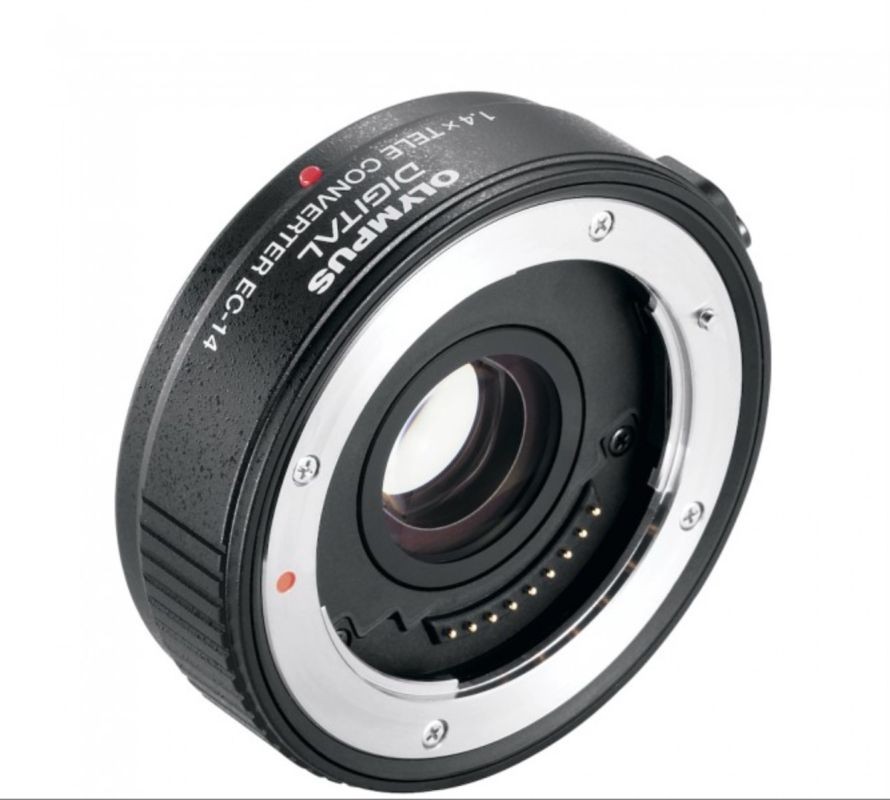
 The diminutive 1.4x Olympus teleconverter that is matched to the 40-150mm F/2.8. This lens is so sharp I almost never remove it from the 40-150mm preferring the extended reach of 420mm when this converter is attached.
An equally impressive add-on to the 40-150mm is the matched Olympus 1.4x teleconverter. It too is simply incredible. So good in fact I almost never remove it from the camera and lens, preferring to have the 112-420mm F/4 combination the two optics provide at the longest range. Keep in mind, like all 1.4 teleconverters, you lose one stop of light with it attached.
As much as I’m amazed with this lens and camera combination, there is one caveat that could be a deal breaker for some people. And that is…… there is no image stabilization when any Lumix camera and the 40-150mm F/2.8 are attached to each other. The reason is due to Olympus not building IS into their lenses. Instead, Olympus builds the IS into their bodies. Panasonic builds all IS into their lenses and has no IS in the GH4 body. Even so, for me it’s not been a problem. Why? Because the lens is so fast at F/2.8 and the GH4 does so well at higher ISO’s, I just crank the lens wide open to F/2.8 and the ISO up for the faster shutter speeds I need to get razor sharp pictures. So far I’ve been totally unfazed by lack of image stabilization. Would I like to have it? Absolutely. But it’s not been the problem I was thinking it might be when I first decided to give this combination a try. It all works so well in fact, I already have the Olympus 300mm F/4 on pre-order. That too will be lacking IS which as a 600mm F/4 equivalent may be more of an issue. But I’m going to give it a try.
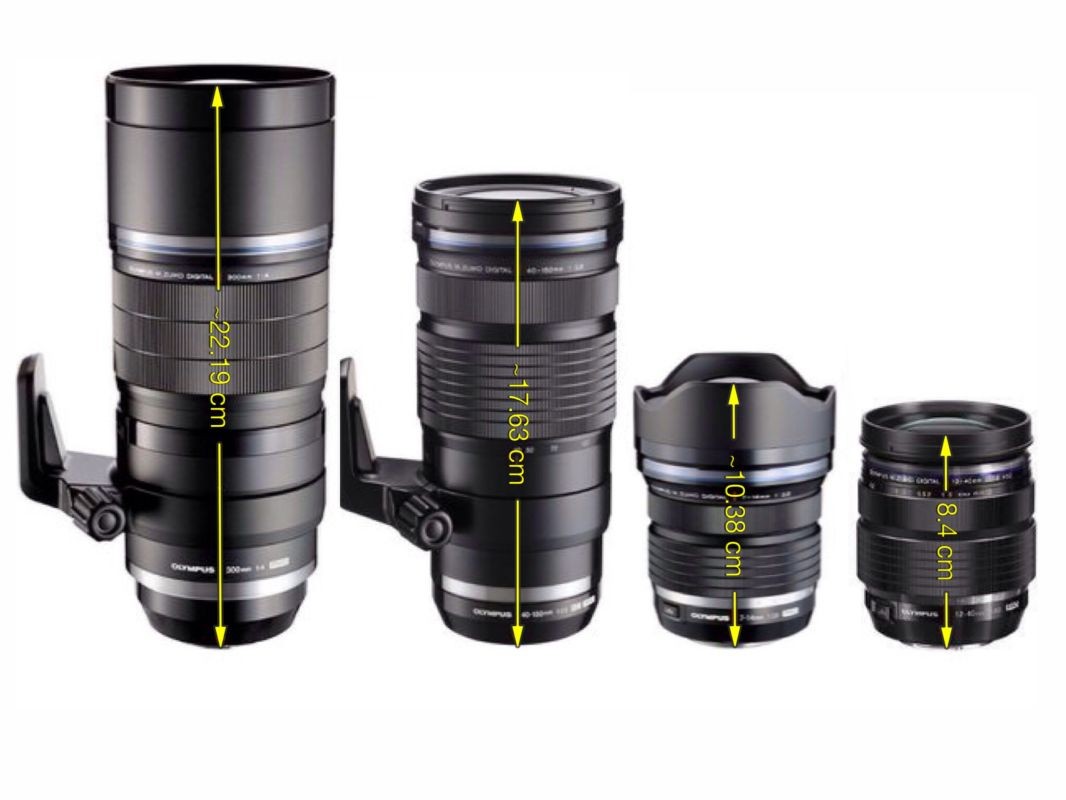
 Photo of the new line of Olympus professional grade lenses was shot by Manuel Fernandez and first appeared on my favorite Micro Four Thirds web site 43 Rumors. From left to right is the 300mm F/4, 40-150mm F/2.8, 7-14mm F/2.8, and the 12-40mm F/2.8. All of them weather sealed and built to professional standards.
The burning question many of you may be asking is, why don’t you just buy an Olympus body to put your Olympus lenses on? The simple answer is I’m just not a fan of Olympus bodies. I find them extremely difficult to use in both the ergonomics and the menu system they implement. Of course that’s just one man’s opinion and others may feel different, but I’ve not talked to one Olympus owner who hasn’t agreed that the OM-D EM-1 has a steep learning curve. Many folks I’ve met love their Olympus cameras but they confess that Olympus bodies take a long time to set up, sorting through the difficult menu system, and then recall all the custom buttons they’ve initiated. You can read more about my experience with the Olympus OM-D EM-1 here in my post titled The Olympus OM-D EM-5: A Very Short Review.
To experience it for yourself, find a camera store that has both Olympus and Panasonic. Spend some time with both the Olympus OM-D EM-1 and the Lumix GH4. Pick each camera up one at a time and try to find the following three tools I use every time I shoot. Look for the WB, +/-EV and ISO on each camera. Make sure you time yourself on how long it takes to find these three options on each body. Being able to quickly access and remember where these three tools reside makes all the difference in whether a camera is going to be an extension of your vision or a mechanical barrier. We all know that great photos often appear out of nowhere and will often evaporate right before our eyes. If you aren’t quick enough with the camera, what could’ve been a photograph is nothing but a memory. It’s that simple. Test both cameras to see what I mean.
The Lumix GH4 and the New Olympus 80-140mm F/2.8
As I mentioned earlier, I feel the new Olympus lens is so good it easily stands out on its own. For that reason I’ve taken an excerpt from The Lumix Diaries 1/13/2015 Cheetah Chase. The following is a description from my recent trip to Kenya describing the speed and accuracy as well as the details of using this combination to capture hunting cheetahs.

 This is the frame I was able to get that summed up the entire scene, although there are many more images from start to finish. For a gallery of more images click on this link. Lumix GH4 with Olympus 40-150mm F/2.8. 250ISO
I was shooting the Lumix GH4 with the new Olympus 40-150mm F/2.8 attached. As I’ve mentioned above, being a Micro Four Thirds lens its equivelant range was actually 80-300mm. This was my first trip with the new Olympus lens and I couldn’t have been more thrilled with its performance. Not only is it as sharp as any lens I’ve ever shot, it’s rocket fast when used with the Lumix GH4. The following series of photos I captured are better than any cheetah chase I’ve ever shot. Interestingly, a cheetah chase has been my defacto example of what MFT could not do compared to traditional DSLRs like my Nikon D4. I’ve said to people more than once, “MFT cameras are getting really good. They just can’t shoot fast action like a cheetah chase.” But this series of images have proven me wrong.
The basic technical specs are as follows. The camera set to AF-S which is not what I would normally do. In fact I messed up and in the excitement forgot to set it to AF-C. The upside to AF-S is the GH4 shoots at a blistering 12FPS. With my GH4’s AF set to Back Button AF I followed the cats throughout the chase continually repushing the AF button to regain focus. Normally I would have had the camera set to AF-C and the camera would have continued to focus as the cats moved far to near, left to right. However, as I mentioned, I screwed up and thus was relegated to constantly refocusing as the cats ran out of the plane of focus. My shutter speed was 1/1600th of a second at F/4.5 and ISO was 250. Thankfully it all worked, but I should have technically been shooting in AF-C. In the end I came away with some of the best cheetah chase footage I’ve ever shot and blew my defacto example of what MFT cameras can’t do right out of the water.
Back Button AF for Optimum Composition
In the cheetah chase description I mention using Back Button AF. This feature is unknown to many photographers but the word has gotten out in the past couple of years and many more are using it. Thankfully Panasonic has given us this essential tool virtually all serious photographers use. Back Button AF is one of the most efficient ways to activate Auto Focus and gives you much better control of what YOU WANT to focus on. Way back in 1990, Canon invented this feature which they included in the revolutionary EOS 1 film camera. The idea behind it is to remove the AF activation from the front shutter (Menu-Custom Settings page 1 Shutter AF=Off) button and move it to the rear of the camera AF/AE Lock Button (Menu-Custom Settings AF/AE Lock=ON). On many of the Nikon and Canon cameras there is a dedicated AF ON button on the back, right side, just below the top LCD panel which your thumb easily reaches. On the GH4 we use the AF/AE Lock button for starting AF. I can’t overstate how effective this feature is for all serious shooters. You really need to try it if you haven’t done so already.
Nikon Professional Services director, Bill Pekala, recounted a story to me in the mid 90’s, relating to how important this feature is to the professional photographer. The story goes like this. Nikon had sent out a survey asking professional photographers what they wanted to see in a new Nikon professional camera which would eventually come to be the Nikon F5. The number one feature request was the ability to separate the AF operation from the shutter button and move the AF start to the rear of the camera. Professionals came to know and love this feature based on Canon’s EOS 1. Bill was at a late stage design meeting in Tokyo discussing the coming features of the soon to be released F5 film camera. It was the second to last meeting where details were being hammered out and the prototype F5 they were discussing still did not have a rear AF Start button. As I remember the story, Bill couldn’t believe the engineers had not yet added this highly requested feature. Bill became a bit animated and commenced beating the table with his very large and powerful fist (Bill’s a big guy), demanding this feature be included. The engineers got the message and the F5 was released with a back of the camera AF button. It’s since become virtually the only way I used AF on all my Nikon’s and the good news is Panasonic has this option as well.
A Buffer That Just Keeps Going
Even at 12 frames per second, in High Speed Continuous, I’ve almost never had the GH4 run out of buffer space. The GH4 will shoot 39 RAW frames before the buffer is filled but if you let off the button for even a second or two, the camera writes so fast, I’ve almost never had it lock up, stopping me from shooting while the buffer dumps files on to the card. The speed it writes to the card just seems to be superior to any other camera I’ve ever shot. I haven’t done any scientific tests but the write speed just seems faster than most cameras. The cards I’m using are the newest 32GB 4K video capable cards from Panasonic that are rated as class 10 U3 SDHC. They read at 90mbs and write at 45mbs.
Touch Screen Technology
The GH4 is completely touch screen capable. Once you have the option of making selections on the LCD menu, via a touch screen, everything else seems prehistoric.
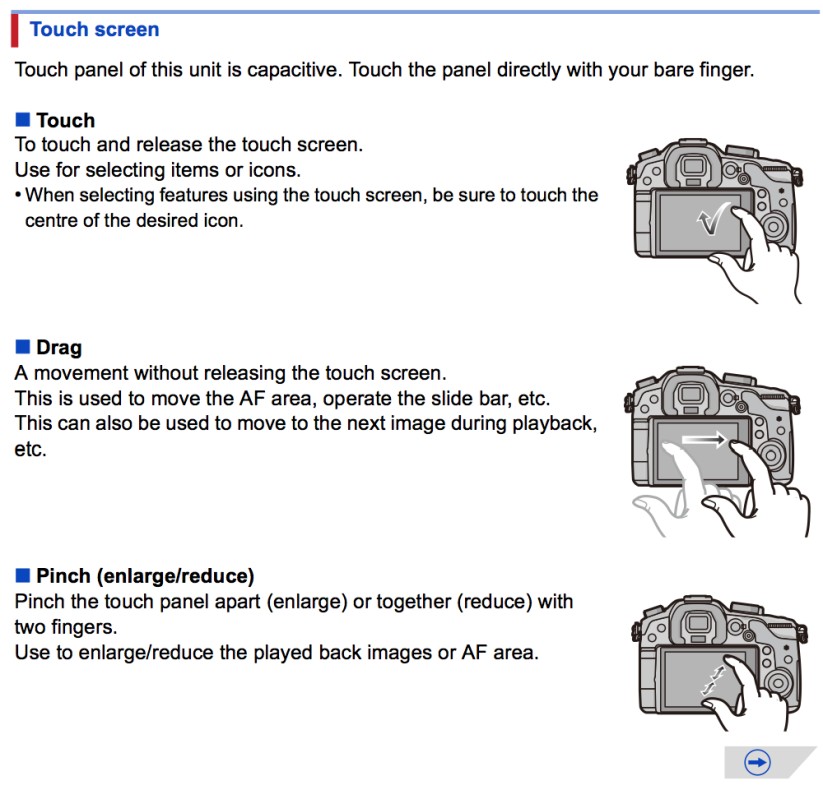
 Touch screen technology to maneuver around the rear LCD.
Most of the time, when I find myself reverting to the dials and buttons, it’s due to forgetting the GH4 has the touch screen capabilities. My favorite touch screen option is being able to activate the AF point via the back LCD screen with my thumb, while holding the camera to my eye. This allows me to move the AF spot at will, any place in the viewfinder, by simply touching the blacked out, rear, LCD and moving the AF box. It’s absolutely brilliant.
Some folks who use their left eye to look through the viewfinder find it a bit more difficult than the people using their right eye. Seems the thumb and the nose are getting in each other’s way. I’ve tried myself, however, and it’s not quite as comfortable as it is for us who use their right eye, but it’s still very simple and effective compared to any other system out there. The is one of my very favorite features of this camera and anyone not using it is missing out on one of the camera’s strongest points. The video below, which I originally created for the Lumix GH3, shows the touch screen AF features. It works exactly the same way on the Lumix GH4 as it does on the GH3, and I created this video for the Explorers who I was trying to explain this feature to through emails. The video details it in a much better way than trying to explain it in writing.
EVF Information
Having an electronic viewfinder gives Panasonic the option to include a lot of information you just can’t get in a traditional DSLR. Without listing all the items you can see in the EVF, I’ll just say, virtually any setting you make in the camera can be seen on the back LCD or in the EVF, including my favorite of all digital tools, the HISTOGRAM. With the GH4 I can constantly be watching the histogram, BEFORE I take the photo, to make sure my highlights and shadows are not being clipped. It is so handy not to have to constantly shoot an image, check the histogram, adjust and reshoot. With the GH4, you know before the photo is taken, exactly where your exposure is. This is immensely beneficial.
Respectable High ISO Capabilities
Even though the Lumix GH4 is using a sensor that is much smaller than full frame, there have been many situations where I’ve been very happy with the quality of the files at ISO settings higher than I would expect. In normal shooting situations I will shoot my GH4’s at ISO 640 to 1600. I don’t like going beyond 1600 but I have shot numerous images at 2000 ISO. Compare this to my full frame Nikon D600 that I shoot normally at 1200-2400 ISO without flinching. Based on these non-scientific numbers you can see that the Nikon has about 1 to 1.5 stop advantage in high ISO’s. In reality, it may be more like two stops since I have shot my Nikon D4 at 6400 ISO but not very often.
4K Video Capabilities
Video is a huge part of this camera and I know there are those still shooters who HATE even thinking about video. Well my answer to that is get over it and get onboard. Those of you who hate video don’t have to shoot a single moving frame but I can tell you video is not going away and it will continue to be a part of every camera in the future in some form or another. There may be an exception or two but most manufacturers won’t be removing video for those few who are unhappy that it’s even a part if their system. Just don’t use it is the simple answer.
When it comes to video I am no expert, but I’m learning as I go and I’m excited the GH4 has such superb, professional video capabilities that I didn’t have to break the bank for. Just today I got a call from a videographer friend of mine that makes his entire living shooting nothing but video who wanted my thoughts on the GH4. He informed me he was selling his Red Scarlet and investing in all Panasonic GH4’s. I’m not surprised; the video is that good.
The GH4’s most important video feature is its ability to shoot 4K video. What is 4K video? Well… quite simply it is four times higher quality (think higher resolution) than the 1080P we’ve been so amazed with on our new TV’s over the past few years. That’s four times the details in the grass, pores in a person’s face, stars in the sky, leaves on a tree, the fur of an animal. All of it four times higher resolution than current 1080P films we see on TVs today. It’s so much detail you will feel like you’re looking out a window, not watching a television set.
The GH4 has the following specs that are hard to believe, especially when you consider it will shoot these specs and save the video footage to an in camera SD Card.
- 16.05 Megapixel Micro 4/3 Sensor
- 4096 x 2160 up to 24fps (100Mbps)
- 3840 x 2160 up to 30fps (100Mbps)
- 1080p up to 60fps
- Variable Slow Motion in-camera up to 96fps (not a sync-sound format)
- 200 Mbps (ALL-Intra) or 100 Mbps (IPB) at 1080p
- 2,359K-dot LVF (Live View Finder)
- 3 inch 1,036K-dot Rear Monitor
- 4:2:2 10-bit or 8-bit External HDMI (4:2:0 8-bit internal)
- Cinegamma Modes
- Peaking and Zebras
- ISO 200-25600 (Extended Mode: 100-25600)
- New UHS I Class III SD card (min. 30MB/s) format needed for over 100Mbps
- 1/8? Headphone, 1/8? Microphone, AV Output, HDMI D (Micro), USB 2.0, Wired Remote Port
- Approx. 50% higher speed signal readout suppresses rolling shutter effect even when using electronic shutter or recording motion image
Speaking of the SD card, it is very important when shooting 4K footage that you have the proper card. I’ve been using the new Panasonic 32GB SDHC I Class 10 U3. Though I’m no expert on these cards, I do know the Panasonic card is exceptionally fast and it’s the U3 part that really makes the difference. There are other card manufacturers that also make U3 cards and that’s what you need to look for if you want to go with either SanDisk, Lexar, Delkin, or whatever. The 4K video capture needs the u3 rating.
Along with 4K video, the GH4 has an exclusive feature known 4K Photo Mode and it’s something nobody else is doing that I’m aware of. 4K Photo Mode allows you to shoot video at ANY shutter speed, including speeds fast enough to stop motion such as 1/1000th. of a second or higher. It shoots these speeds in video mode at 30fps and you are able to pull individual 8-megapixel stills from each one of those 30fps. Sound too good to be true, you should see it in action. It’s hard to believe what you are getting. To me 4K Photo Mode is just another tool for helping to tell the stories I want and need to tell. It’s not something I will use in exchange for shooting stills, but it is just one more high tech option that will help me get just the right picture in some situations like the one I wrote about below. The text regarding 4K Photo Mode was taken from an earlier blog post titled Lumix GH4’s 4K Photo Mode Publishable Stills From Video is Finally Here that appeared last December on the Corkboard/Blog. I’ve reposted it below for this review since it describes the 4K Photo Mode in detail.
4K Photo Mode, Stills From Video is Finally Here
Panasonic brings us a tool no other camera company has that I’m aware of and it’s called 4K Photo Mode. I first predicted this feature with the original release of the $50,000 Red One nearly ten years ago. I mentioned my prediction that stills and video were going to merge in a post from April 30th, 2009 titled Daniel’s First Film- A New Face in Town. 4K Photo Mode finally makes this capability available to the masses. It gives the photographer the ability to shoot video at 3o frames per second and pull individual 8-megapixel still images from the video clip. I tried it for the first time this past November while working with Polar Bears International and the Arctic Documentary Project in Churchill and it is nothing short of amazing.
The video above was captured using a Lumix GH4 in 4K Video Mode. The lens was a 100-300mm zoom being handheld. The video is jumpy and horrible to look at as moving footage. But I wasn’t shooting it for video, I was shooting it for stills. Ideally, I should have been using a tripod but this opportunity came quickly and I viewed it as a simple trial.
Below are two frames pulled from the video above using Apple’s Aperture. Notice how in the first image, the bear’s breath is highlighted due to the background being a dark shadow. In my mind this was THE frame. I was able to grab/scrub through the video clip to capture the exact moment the breath was exhaled against the darker background, giving me the best frame from that one second opportunity that the camera caught 30 frames of.

 This frame was specifically chosen for the breath being exhaled. I had almost 30 frames to choose from since the exhale lasted about one second. I’ve captured things like this in the past with just timing my shot but to not have to worry about tripping the shutter at the exact moment that best shows the cold was very rewarding. Click on the above image to download a full sized JPEG for your own personal review.
The second photo is again from the same video. I chose a frame where the bear’s head was at the top of the arc. Polar bears swing their heads as they move and trying to predict the exact moment of the arc is very difficult to time perfectly. By shooting at 1/500th of a second shutter speed in 4K Photo Mode, the video produced was capturing 30 FPS and I was able to pull a single frame where the bear’s head was perfectly still, at the top of the arc, giving me a very sharp image.

 This frame was chosen for all the right body language, paw up, head at the top of the arc, etc. Click on the above image to download a full sized JPEG for your own personal review.
Video is not typically shot at such high shutter speeds. Doing so makes your moving footage look choppy. Generally, when shooting video, you are shooting at a shutter speed of 1/30th, 1/50th, or 1/60th. of a second which makes video images look smoother and more natural when combined in clip form. But we all know that to stop action you need a fast shutter speed, especially with a long telephoto lens. That’s where 4K Photo Mode comes in. In 4K Photo Mode you can shoot as fast as shutter speed as you want or the lighting and camera allow. For me this is just one more tool to add to my bag of tricks to capture that one decisive moment.
4K Photo Mode Conclusion
Just in case you need some inspiration for how this might work here are some examples of how 4K Photo Mode can enhance your still photography:
- Nature photographers trying to capture a bird taking off or an industrial photographer who is trying to do some motion analysis will find 4K Photo Mode a welcomed feature!
- Golfers can use 4K video mode to capture and analyze their swing with the uneekor qed package.
- Macro photographers can more easily deal with the extremely shallow depth of field by capturing a few seconds of 4K video while manually focusing across the depth of their subject. Extracting a few images from the 4K video, and combining (stacking) them in Photoshop produces an end result with much more depth of field.
- Young children seldom sit still for a photo. Capture some 4K video while talking to the child can allow you to capture those rare nuisances that traditional still photography might miss!
The future is definitely here with 4K Video Mode. Competitors will be scrambling fast to offer something similar and this is just one example of the technological advantages a company the size of Panasonic can bring to our industry. Panasonic is really on a roll and I predict it’s just the beginning.
Professional Sound Capabilities
It is often said that 50% of a great motion picture is the sound. From my experience I’m certainly a believer of this statement. To give this camera as good of sound recording equal to its amazing 4K video, Panasonic offers an add-on called the Panasonic DMW-YAGH Pro Audio Video Interface.
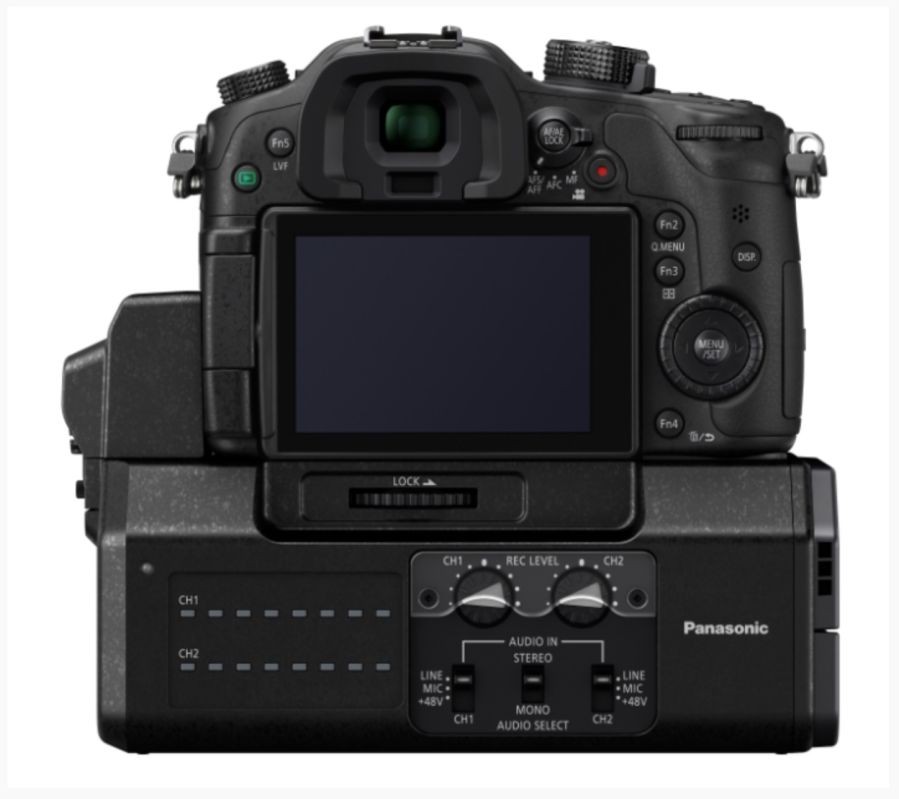
 Panasonic DMW-YAGH Pro Audio Video Interface attached to the bottom of a Lumix GH4.
This is a very specialized piece of equipment for serious video shooters and allows for capturing truly professional quality sound. I don’t have one and right now I can’t see getting one unless I start doing much more with video.
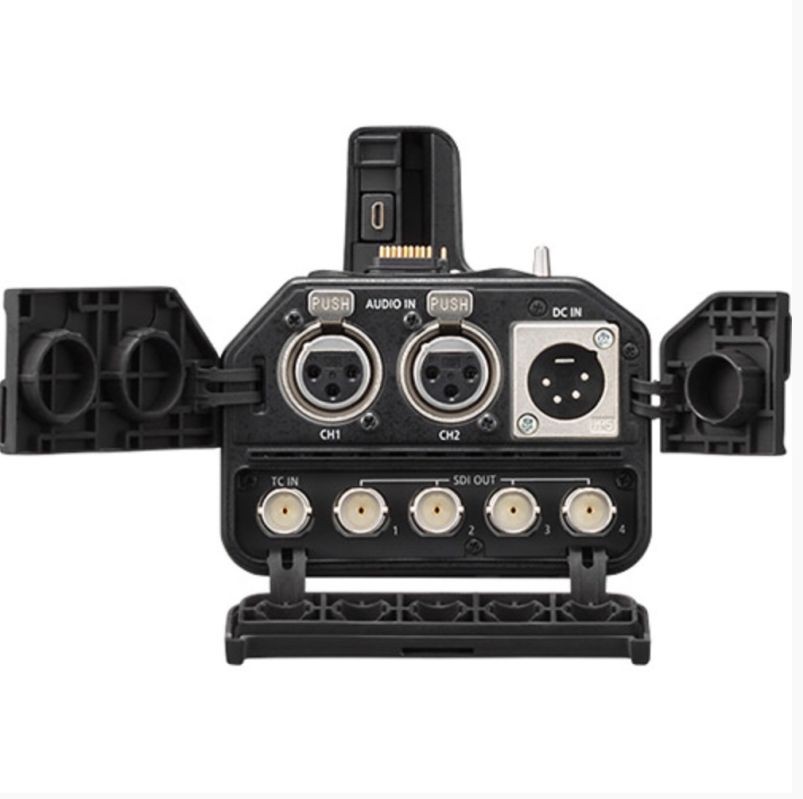
 XLR connections for microphones are standard for professional quality sound. So is the ability to adjust volume in this separate device.
However for those that depend on video production, Panasonic has provided a serious option for getting the highest quality sound possible in to the video footage being shot.
My Custom Function Settings on the Lumix GH4
One of the benefits to all serious cameras today is the ability to customize them to your heart’s content. The GH4 is no exception and I’ve set mine up in a way that works for me. All cameras I’ve used have less than perfect menu systems for custom changes. Every camera has so many choices, it’s just plain difficult to remember exactly where one feature is that may have been turned on or off. That said, because of our Natural Exposures Invitational Photo Tours, I’ve had many opportunities to help one Explorer or another try to figure their custom menus out. Camera menu systems I know well or fairly well include Nikon, Canon, Panasonic, Fuji, Olympus, Pentax, and several other less popular brands.
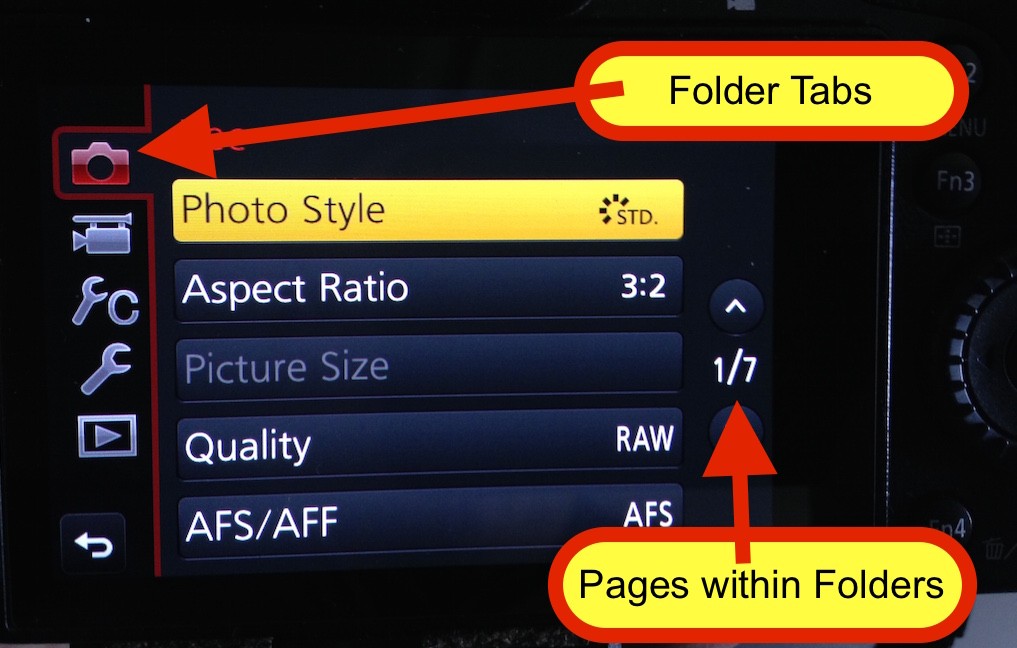
 Panasonic’s menu setup is easy to follow and straightforward with the left side tabs being folders that relate to different parts of the camera. This first tab is for the Record mode for still photos which my large arrow covered up. The 1/7 on the far right side tell you which page of the particular folder tab you are in.
The two best systems I’ve ever worked include Nikon and Panasonic’s Lumix. The most difficult menu I’ve ever dug into is on the Olympus OM-D EM-1. Nikon and Lumix have a very similar menu layout, so it was fairly easy to get a handle on the Lumix setup from the very beginning. Many people ask me about the Custom Settings on my GH4’s so the following is a list of all the different options I regularly change from factory defaults. If I haven’t changed anything from the it came from the factory, it won’t be listed. All items listed in RED are very important for action photography.
Record Tab
- Photo Style= Standard
- Aspect Ratio= 3:2 ( I use 3:2 to match the aspect ratio of my Nikon cameras so presentation images are consistent)
- Quality= RAW+Jpeg Fine (Jpeg is for a backup image as well as to easily load to my iphone if needed)
- AFS/AFF= AFS
- Metering mode= Matrix or Evaluative
- Bust Rate= High
- ISO Limit set = 1600
- ISO Increments= 1/3 EV
- Extended ISO= On
- Long Shutter Noise Reduction= On
- Color Space= sRGB
Motion Picture Tab
- Photo Style= Standard
- 4K Photo=On when Needed (Manual Exposure)
- Rec Format= MOV
- Rec Quality= Depends on every shoot
- AFS/AFF= AFS
- Continues AF= On (Sometimes Off if I’m using Manual focus which is almost never)
- Metering= Matrix or evaluative
- Sound Output= Recorded Sound
- Mic Level Display= On
- Mic Level Limiter= On
Custom Tab
- AF/AE Lock= AF On (This is the option for using rear button AF activation)
- Shutter AF= Off (This needs to be turned off if you have the above option set to rear button AF)
- Quick AF= Off
- Eye Sensor AF=Off
- Direct Focus Area=Off
- Focus Release Priority=Focus
- Peaking=On
- Histogram=On
- Zebra Pattern=Zebra2
- Constant Preview=Off
- Monitor Info Display=On
- Auto Review Duration Time=Off (Very, very important to turn this off for action photography)
- Fn Button Set-None other than what is default.
- Eye Sensor=Low
- Touch Settings
- Touch Screen=On
- Touch Tab= On
- Touch AF=AF
- Touch Pad AF=OFFSET (This has to be set to move AF sensor around LCD with finger)
- Shoot without lens=On (this is so I can use my Nikkor 600mm F/4 with an adapter)
Setup Tab
- Live View Mode=30Fps
- Battery Use Priority=Battery Grip
- Menu Resume=On
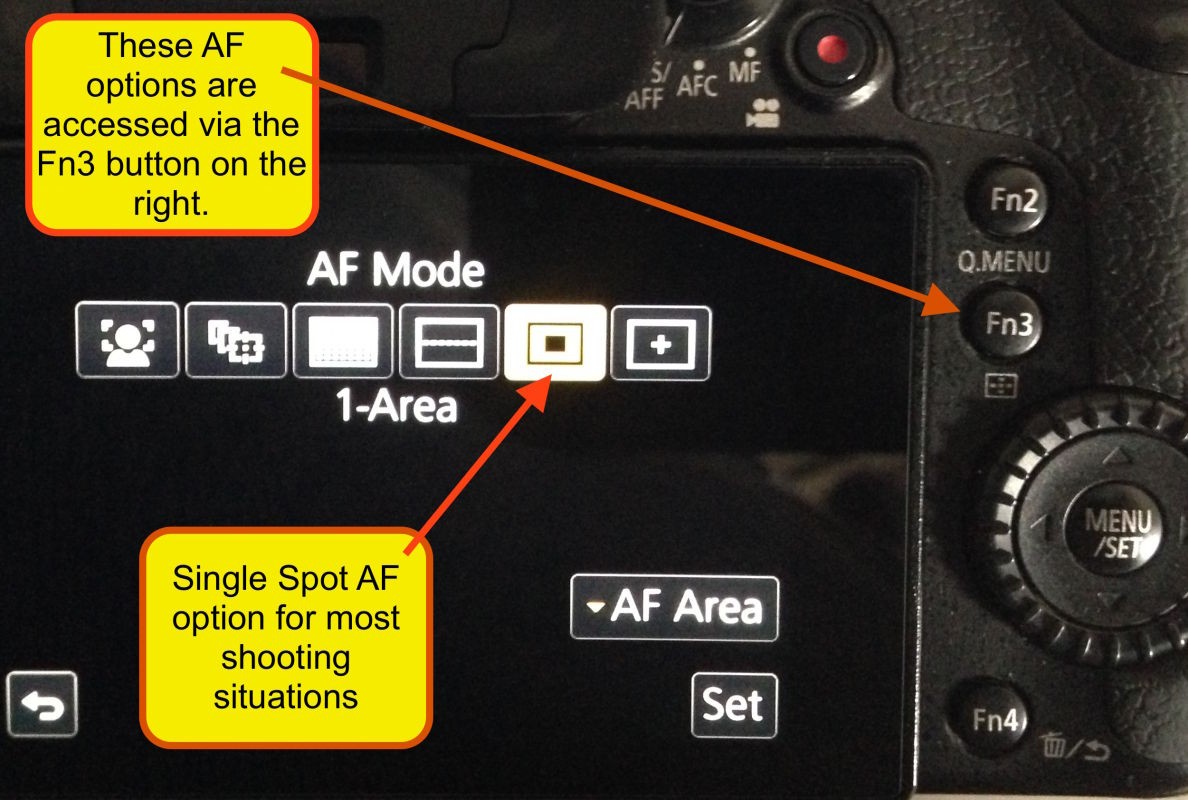
 The Fn3 button to the right of the LCD is for changing the numerous different AF zone options. I generally use my GH4’s on the single AF spot which can be enlarged or reduced in size at will. The others I sometimes use, especially the face AF option when I’m shooting events with people in them.
Wireless Connectivity
All of the new Panasonic Lumix cameras allow you to connect directly to your iPhone, iPad, or other devices like Android. They even have the option of being able to send your pictures to a TV or PC. Most users however are most interested in the ability to get photos out quickly in an email, up to Facebook, or other digital repositories. For most people, to solve this burning desire, the iPhone and other devices have become the camera of choice. It’s also helped that virtually everybody carries their cell phone. As the old adage goes, “the best camera made is the one you have with you”. That said, I do believe most people are still interested in better quality if they can easily share as well. When I show our NE Explorers how you can transfer photos from your camera to your iPhone or iPad they get really excited. Their enthusiasm suggests they not only want the ease of use, they also want higher quality images the Lumix provides if they can also easily share them.
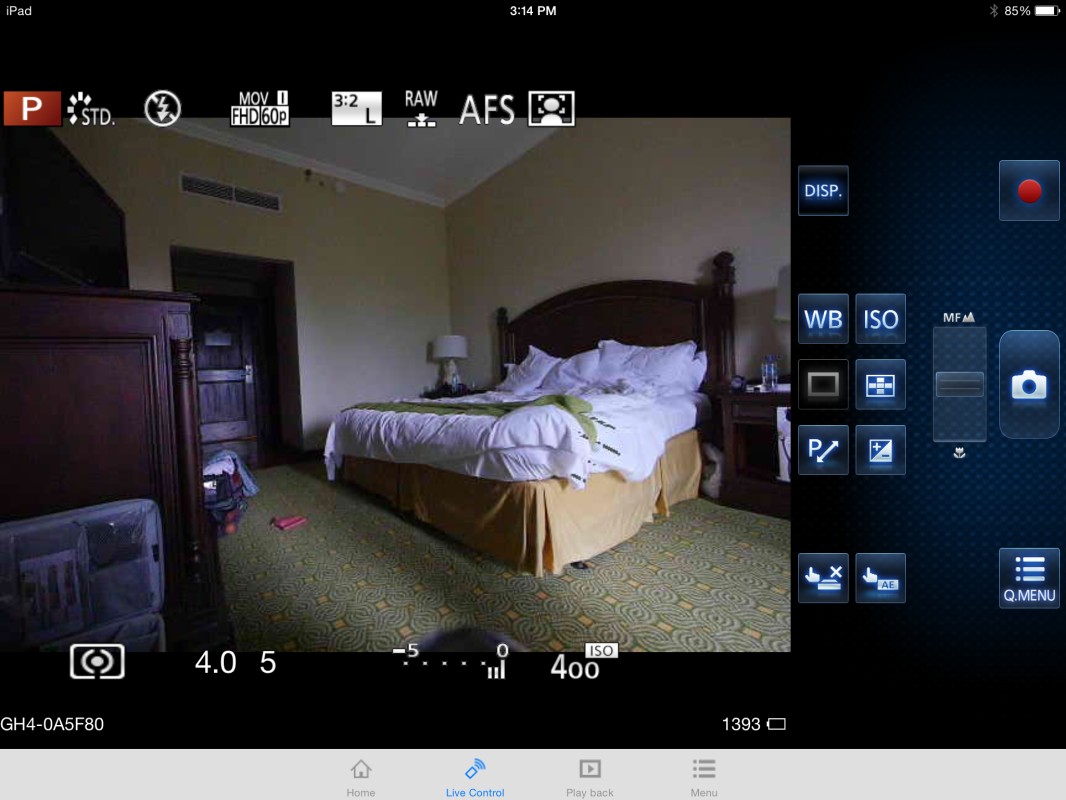
 A screen shot of the GH4 being remotely controlled from my Apple iPad via Panasonic Image App. Notice all the controls you can change. This is the same screen you would also see on your iPhone or Android app.
Panasonic Lumix cameras are doing their best to solve this problem by allowing us to easily send the images from our camera directly to our iPhone, iPad, or Android device. Unfortunately, figuring it out isn’t as simple as it could be, so below are two major requirements that make the process much more efficient. Both of these nuggets of wisdom listed in the manual are easy to overlook. For the record, the steps I’m about to outline are given for Apple’s iPhone. Android users will have to decipher this for their own system.
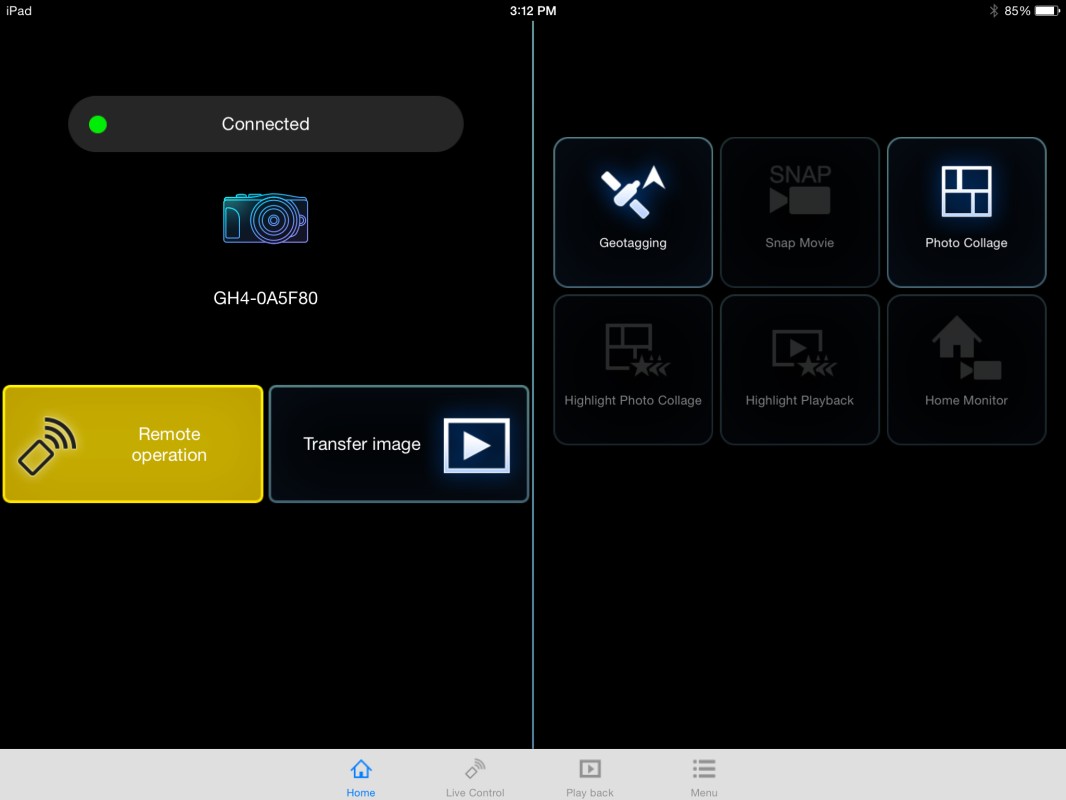
 This is the opening screen of the Panasonic Image App. Notice you can access the camera for remote operation as well as transfer images and movies over to your iPad or iPhone to easily post to social media outlets.
First and foremost, once you have hit the Wi-Fi/Fn1 button on the GH4’s top deck, you now must go directly to your iPhone or iPad and open the iPhone/iPad SETTINGS app. There you will find Wi-Fi listed. Touch Wi-Fi and the next screen appears and it should show you the GH4. Select GH4 and a screen will pop up requesting input of the listed password or capture the QR Code on the same page. Open the Lumix App and it should show you an option to capture the QR Code with your iPhone’s camera. This whole process is the most difficult part and you should only have to do it one time. Once the password is typed in or the QR Code captured, you will be able to skip all of this by way of an option that states “Select a destination from History” the next time you turn your cameras Wi-Fi on.
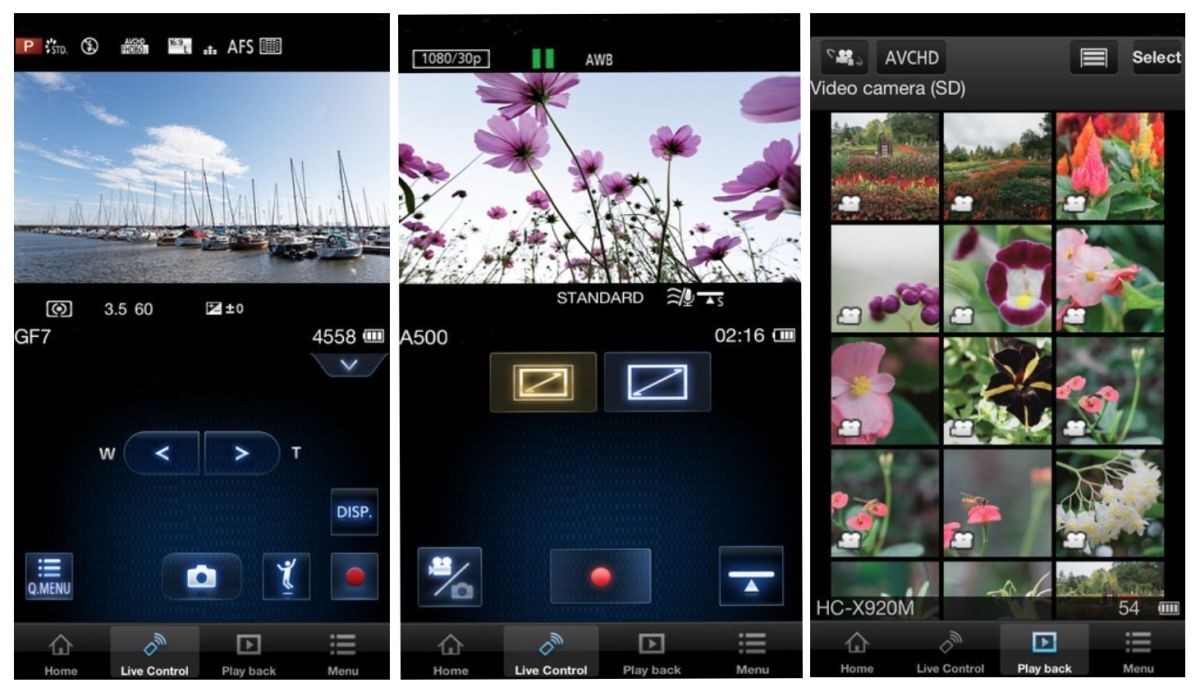
 Screen shots of the iPhone version of the Panasonic Image App. This app makes getting the image to your phone a breeze. Yo can set it up so as you shoot the JPEGs go to your phone and the higher quality RAW files stay on your cameras card. It’s the best of both worlds with much, much higher quality images than what you get from your phone.
The other necessity which the manual mentions but is easy to miss, is the need to be shooting a JPEG. You can also shoot RAW but if you shoot RAW ONLY the images will not show on the screen within the Panasonic Image App since it won’t transfer RAW files to your iPhone. That being the case, I will often shoot RAW+JPEG so I can quickly transfer images if I choose.
The initial Wi-FI setup process has become close to simple since the latest firmware and software updates. It’s much easier than it was when I first tried many months ago. The Panasonic Image App has come a long way and is full of amazing features. By the way, the app you need to download is the Panasonic Image App not the Panasonic Lumix Link app. The Panasonic Image App has the ability to run the GH4 from your phone. You can shoot stills, video, change many of the settings like quality, WB, +/- EV, ISO, move the AF sensor, change AF modes, aspect ratio, photo style, picture size, metering mode, flash mode, record format and video quality. You can not change Exposure Mode so whatever mode you select is what you will be using until you manually change it on the camera itself.
When I first tried the wireless control several months ago, I was disappointed in the range. At the time I was not able to get beyond 15 feet or so. This morning I did a test both indoors and out and I’m pleased to say that Panasonic has increased the Lumix’s range dramatically. I can now get consistent firing at 45-54 feet or 15-18 yards both indoors and outdoors.
GH4 Negatives- Fixes or Additions Needed
Ok, so now you’ve read all the great things about the GH4, yet we all know that nothing is perfect. However, there are some photographers that are under contract from other manufacturers that won’t share the blemishes of other camera systems. My philosophy is simple. We’re all adults and most of us smart ones at that. None of us believe anything is perfect and so along with the good you’re going to get a rundown of the not so good to boot. You need to know about some of the things you may not be so happy with if you decide to buy one of these amazing new image capture machines. Like many of you, I always weigh the pros and cons. So here they are.
GH4 and GH3 Eye Piece
Without a doubt my biggest complaint along with numerous NE Explorers is the GH4’s and GH3’s rubber eye piece. In short, they fall off with the slightest touch. I’ve lost so many I’ve lost count and I know others having the same issue. Amazingly this has been an problem since the GH3 which also had the identical system that also didn’t work. I thought they fixed it with the GH4 but I can assure you it has not been fixed. The rubber eye piece falls off constantly and thankfully it’s generally in my camera bag so I’ve only had to actually go out and buy a half dozen or so. I’ve finally quit buying them and just plan to shoot without if I lose it again. I have pretty much solved the issue by taking a piece of black gaffers tape which is very similar to duct tape. I tear a piece off that is about a 1/4 inch wide and wrap the entire exterior of the eye piece that attaches to the camera. Panasonic needs to put the B TEAM on this challenge and come up with a better locking mechanism that locks the rubber eye piece in place.
Lens Shades Keep Falling Off
Once again this is an aggravating problem that seems like it would be so simple to fix. Not all the lens shades for all lenses are poorly designed. The 42.5mm F/1.2 is a superb shade made of metal with a locking screw that keeps it in place beautifully. The 35-100mm F/2.8 lens shade is made of plastic but it too has a sold, tight fit and it’s never fallen off. However, I have lost three lens shades for the 12-35mm F/2.8 and I have two other NE Explorers that have had the same problem. The locking connection, bayonet type that snaps in place with a plastic notch, is just too loose. Especially after a few weeks of use since the plastic begins to wear and gets even looser. Another great project for the B team engineers.
LCD Playback Mode Needs 100% Option
Many of you already know that to review your images at anything less than 100% is virtually useless. It’s essential to always review your pictures at 100% to really see if the image is sharp or not. All good photographers review their images on the computer at 100% but ALL photographers, serious or not, can’t help but review their images in the field as well. Until recently, no camera company that I know of has ever showed when the cameras zoom function was at 100% when viewing on the camera’s LCD. Recently, I had a chance to see the new Nikon D810 and D750 and to my amazement both are now showing where the 100% zoom is. This feature is a no-brainer and Panasonic needs to add this to all of their cameras, but it would be especially useful on the GH4. This is the kind of thing that Panasonic needs to think about before the competition does. Little things like this can set you apart, like the touch screen that many Lumix cameras have.
Wireless Flash
The Lumix Wireless flash system is a great first attempt but unfortunately the end result is less than stellar. When I reviewed this same flash with the GH3 I had much less experience and I felt it worked very well. I was wrong. I’ve tried working with my half dozen FL360’s as well as a couple of the newer, larger and more powerful FL580’s. All of them have the infrared wireless system and none of them fire consistently when set up in their wireless mode. It’s been very disappointing. To get them to fire consistently, each strobe must be within 15-20 feet at the furthest. All heads have to have perfect line of sight to the main commander strobe on camera and that’s virtually impossible since I’m typically lighting something on both left and right sides to get the kind of lighting that makes an image interesting to look at. I suppose if I had one or more on one side and was able to point the main command strobe directly at them that they would most likely work. But that’s not reality in most situations. Oh well, I’m certain Panasonic will get this hammered out eventually. Ideally they will completely reinvent their system and give us radio controlled flashes like Canon has done. That would be the ultimate and show us they really do want the professional photographer. This wouldn’t be such a disappointment if we had access to the many third party options available for our Nikon and Canon systems but third party systems for Lumix are nonexistent as of right now.
Electronic Release for Third Party Add-ons
I’ve spoke to several people about the difficulties of getting third party applications to work with the Lumix electronic circuits specifically used to trip the shutter. I’m not an electrician but I’ve heard more than once that the system Lumix uses is very unusual. Why is this a big deal? Because this unique circuitry makes it difficult for third party companies to make products we can use. Things like the Lightning Bug Trigger, CamRanger, TriggerTrap and many other electrical products that need a common gateway to the camera.
I’m getting mixed messages on this issue. One of my contacts at Panasonic says that the Lumix connection is very adaptable but I’ve heard from third party vendors that’s not the case. Apparently both Nikon and Canon have some sort of patent on their proprietary connectors and Panasonic had to reinvent something that would work. If there are any third party developers having issues adapting their designs to Lumix cameras please drop me a note or better yet post your concerns here on the Blog and I’ll get you to the best people at Panasonic to help you out. In the end all we want is for the Lumix line of cameras to be as adaptable as possible for third party developers.
The End
So that’s the nitty gritty detailing my thoughts and observations after a year’s worth of photography and video using the Panasonic Lumix GH4. Is it perfect? No. However, it’s a HUGE step up from the Lumix GH3, and I’m now shooting Lumix cameras for 90% of my work. Do I trust this camera with fast moving action like I do my Nikon D4? No, not quite yet, but it’s getting very, very close. Combine the GH4 with the new Olympus 40-150mm F/2.8 and the gap has closed on the D4 considerably. I still plan to do additional AF tests for a more definitive answer but as the Cheetah Chase points out, in real world situations, this Micro Four Thirds camera is proving that it won’t be long before it matches the bigger, better known cameras, and I predict it will surpass them in the next generation. Dare I call it the GH5? We shall see.
If any of you out there have things to add, please join the conversation here in the comments section of the Blog. I’m always excited to know what others have experienced or have to say.