

Yesterday Yahoo announced they were improving their photo sharing site Flickr, giving every Flickr user one Terabyte of free cloud storage for photographs. “Wow” I thought. “What a deal”. I’ve had a Flickr account for a least a couple of years but I’ve never used it. So off I went to figure out how to get reengaged with Flickr.
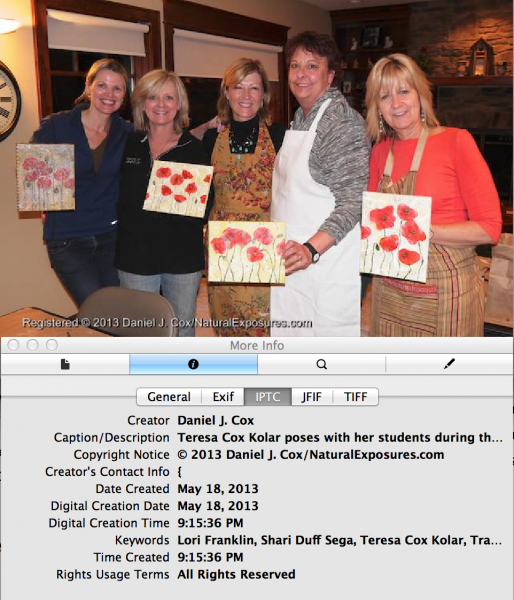
The information above this caption and below this image is what is known as Metadata or what I refer to as Contact Information. This is embedded in each image when I put this through my digital photography software, Apple’s Aperture. This information is hidden and is only viewable if you have a program like Apple’s Preview which is what I used to open this information.
To start off I uploaded about a dozen images I shot of my sister teaching an art workshop while I was home in Duluth this past week. When I uploaded these images to my computer, from my camera’s SD card, my photo program Aperture automatically embeds all my Metadata/Contact Information into each image. That info includes my copyright info, physical address, email, web address, phone number, year the image was first published and all the other items commonly added on Import into Aperture. Some programs show all Contact Information, however, Apple’s Preview shows just the basics which are visible above. The photo above was an image I exported from Aperture onto my desktop
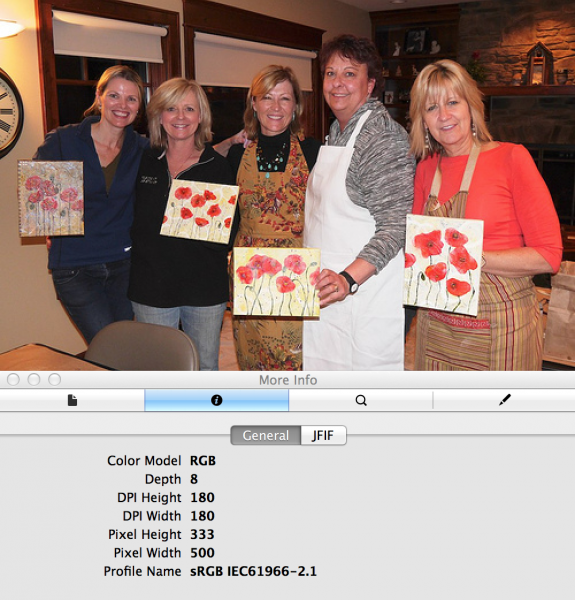
Here is the same image after I drug the photo to my desktop from my Flickr page. Notice all Metadata/Contact Info has been removed compared to the one above. If you review the first image above, look for the tab that says IPTC. That is where Contact Information resides and it’s gone form this photo.
and then opened in Preview. The image below is the same image after it was uploaded to Flickr. I then drug this image from the Flickr website to my desktop, opened it in Preview and found all Metadata/Contact Information had been removed. What’s even more unsettling is Flickr is allowing the highest quality files to be uploaded. You can actually upload a full resolution image to Flickr now. This will give people the ability to pull these images down and use them in magazines, posters, web pages, books, calendars, ANYTHING they want. And nobody will have any idea who owns YOUR image. Flickr does have some options for restricting downloads but even their FAQ warns against posting any photos you don’t want to lose control over. Here is the info from their FAQ:
“We’ve made changes to the page to discourage casual downloading and make people more aware of image ownership …. by ‘discourage’ we do mean simply ‘discourage’. Please understand that if a photo can be viewed in a web browser, it can be downloaded by people who actively disregard our roadblocks.”
As beautiful as the new Flickr is, I’ll be sticking with my PhotoShelter account for all my photos other than the people pictures I shoot of our guests in the field. If you do plan to upload images to Flickr I would certainly not upload any image larger than 600 pixels on the long side, I would also make certain it had a watermark on the image itself and I would register all images with the U.S. Copyright Office. You can find out about adding watermarks and registering your photos by following this link, How to Protect Your Photo Rights.