

Lumix GH4 Question about RAW Support
Perhaps a potential ‘duh’ question but…. Had my maiden voyage with the new Lumix GH4 yesterday at a family event. That evening, I downloaded the evidence into Bridge and….”Not
tonight Josephine.” I had shot all day in Raw and realized that Adobe hadn’t time to come up
with a conversion for the new camera.The questions are; should I shoot in jpeg until they come up with a conversion or, is there a workaround till that time comes? I’m trying to take the camera through an intensive shake down period because I’m going on a trip at the end of the month and I was hoping it would
be my first ‘nikonless’ excursion.
Trent, yes, one of the downsides to a completely new camera is waiting for the software developers to provide RAW support. It’s the price we pay for being on the cutting edge I guess you could say. However, my temporary fix is to shoot both JPEG & RAW. The JPEGs allow you to see and work with your images immediately and the RAW is there for you to go back to once the software catches up. To set your GH4 to shoot both JPEG & RAW go to the Main menu, little Red camera in upper left tab. Select the red camera tab, click to the right you will see the fourth option on the 1/7 page of the menu is the QUALITY setting. Select Quality and up pops five options. You want the middle one which says RAW with a little down arrow on top of two rows of blocks. This is just that and the arrow pointing down signifies JEPG compression. I actually shoot both JPEG and RAW most the time . Hope this helps.
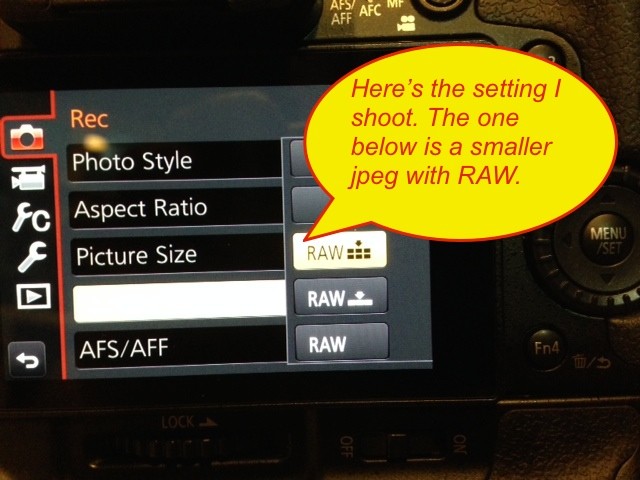
Photo of what you’ll be looking for in the GH4 menu.