
January 9, 2015
The Lumix Diaries begins 2015 in my favorite African country of Kenya. I’ve been coming to Kenya almost every year since 1991 and I never get tired of this wonderful country, its wildlife and its people. This adventure finds me even more entrenched in the Lumix system which I’ve stuffed into a Lowepro Roller 200, some for myself and a couple cameras for our NE Explorers to try.
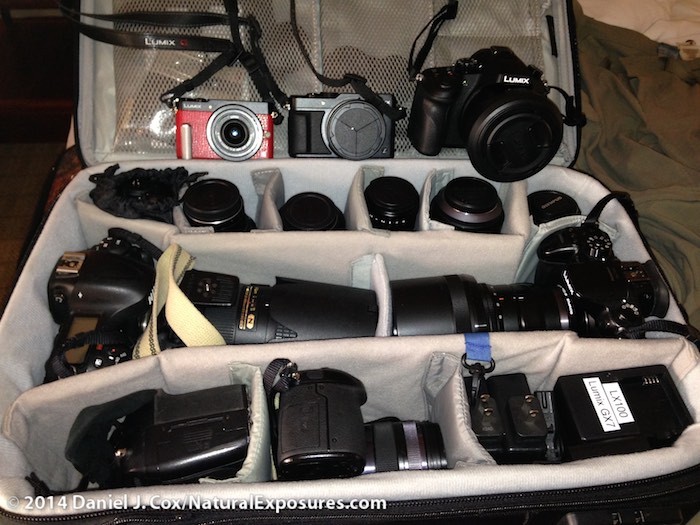
My Lowepro Pro Roller 200 the very newest version filled with Lumix and Nikon cameras and lenses.
My Lowepro Roller is filled with:
Bodies
2-Lumix GH4’s
1- Lumix LX100
1- Lumix FZ100
Lenses:
Lumix 7-14mm
Lumix 12-35mm F/2.8
Lumix 35-100mm F/2.8
Leica/Lumix 42.5mm F/1.2
Leica/Lumix 15mm F/1.7
Lumix/Leica 45mm Macro
Lumix 100-300mm F/4-5.6
Olympus 40-150mm F/2.8
Olympus 1.4X teleconverter
Misc Accessories in a second case.
Kenko extension tubes
6-FL360 strobes
GoPro Black 4K camera
Panasonic MS2 Video Mic
Sennheiser EW-100 G3 Lavalier mic
Eneloop rechargeable AA batteries
Bogen Manfrotto portable light stands
2-Westcot 43 inch, collapsable umbrellas
6-Trigmaster ll Radio strobe triggers
We’ll not just be photographing wildlife and the countryside, but we hope to set up a portrait studio as well. Thus the reason for umbrellas, strobes, etc. We’ll talk about that more, probably on the second trip.
I’ve also brought along some of my Nikon gear since there are some situations where I just have to have the extra AF speeds and low light capabilities of the larger full frame cameras. It will be interesting to see how much I actually use them and after schlepping a complete additional Lowepro Pro Roller 200 for just two lenses and two Nikon bodies, I’m already rethinking bringing this additional equipment. Without my dear wife Tanya, I couldn’t have done it.
Lumix is probably just one lens and the coming GH5, away from replacing my Nikon cameras altogether. Panasonic desperately needs to update the very capable 100-300mm F/4-5.6 zoom and make it even more capable and professional by turning it into a consistent F/4 with the build and quality of the current 35-100mm F/2.8. We need this lens desperately and until it comes I will never be able to eliminate my Nikons completely.
Getting the Cameras Setup for video
One of the first things on my list is to get all the Lumix cameras setup for video. I plan on shooting a lot of video this trip since I have such amazing 4K video capabilities in all but the smallest of my Lumix cameras. What do I mean by getting the cameras set up? It involves making sure all of your cameras are shooting the same settings across all the different models. If you only have one camera it’s not a big deal, but when shooting one or more cameras you need to make sure they are all on the same page, so to speak.
The first things I need to do is to go to the main menu and select the little video camera icon/folder. In that folder you will see Rec Format. I make sure this is set to MOV which is the highest quality I can get on my GH4’s.
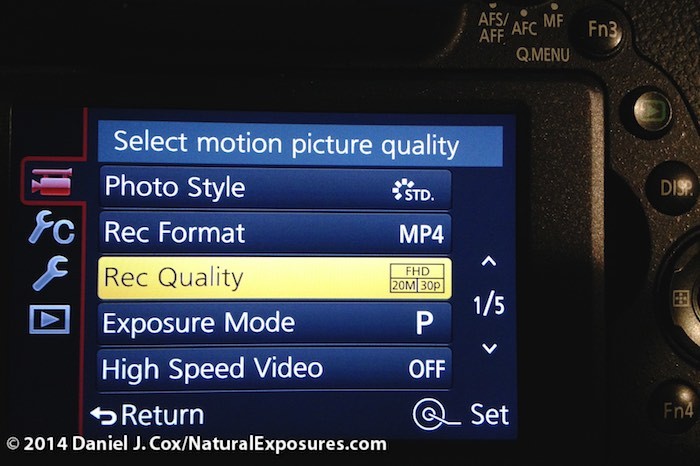
Notice the red video tab in the upper left. This takes you to the options for video capture.
Next I move to Rec Quality which has several different options; the one I’ve selected is FHD/20M/30p. I want to try and set all my cameras up as close to the same settings as possible so when bringing them into Final Cut Pro X, they don’t need to be converted in any way. It will save time and possibly quality loss.
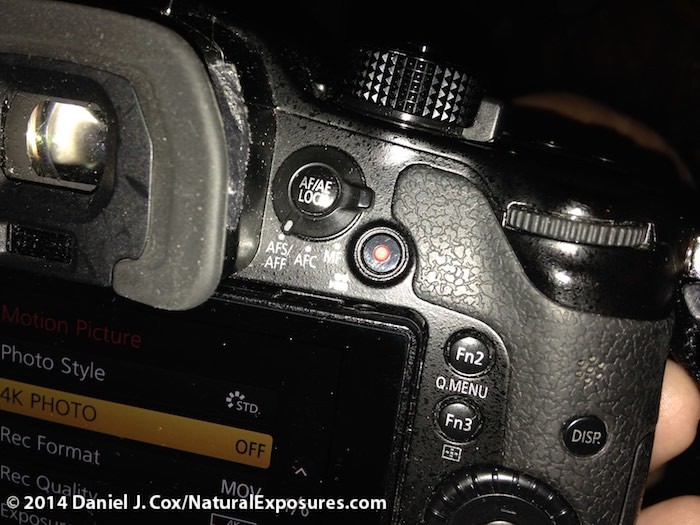
The little, red, video button on the back of the camera is what I go to for general “people having fun video” when the camera is in the normal still photos, shooting mode. This gives me instant on Video in several options less than 4K which is just fine since I don’t want 4K for the general run of the mill, people in the field footage.
The FHD/20M/30p setting is just for capturing the people having fun video and is not the highest quality 4K setting. I can quickly access this less then 4K option by easily pressing the little, red, Video record button on the right upper corner of the GH4 even if I’m shooting stills in P,M,A or S.
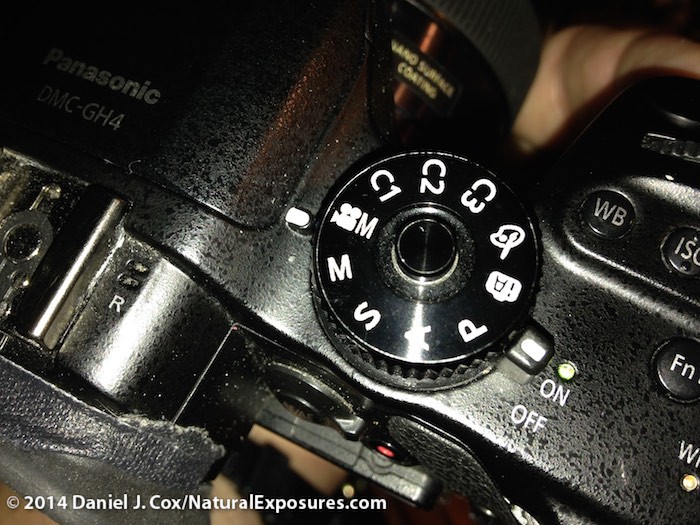
The top deck Mode dial showing the selection of VideoM for 4K video capture.
For serious, broadcast quality video of the wildlife I’ll be seeing, I want to be setup for 4K. You do this by first turning the camera’s top deck, mode dial to the VideoM setting. By changing the dial to this setting (VideoM) it allows for the camera to be set to 4K Video which is further accomplished in the menu. You won’t see the 4K option if you don’t set the mode dial to the VideoM position. When a scene takes place I want to shoot 4K video of, I quickly turn the Mode dial on the tip deck from the P setting I always use for stills, to the VideoM setting that now allows me to start capturing 4K video footage. In summary, P (Program) for stills. Little, red video button on back of camera for fun and friends video (1080P) and finally Mode dial set to VideoM for serious, broadcast quality 4K video footage.
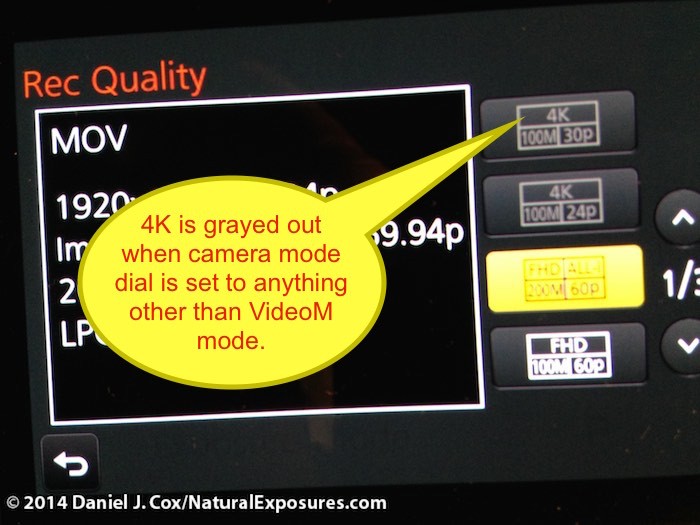
No 4K video option when the camera is on M,A,S or P mode on the upper top deck Mode dial
My next project is to make sure all my camera’s clocks are set to the exact same time. For this I open the camera menu to the Set Time folder and get the time, hour, minutes, and date set.

Setting mu camera clocks to all be exactly the same via my Mac’s clock window.
I then open the Clock setting on my Mac and watch the second hand come around to the very top or the 12 setting. When the second hand gets to the 12 I hit the SET button on my camera and the clock is now set to the exact time second, minute, and hour of the current date. I then do the same for all other cameras and by making sure they are all set, with the second hand at the 12 position, they will all have the identical same time.
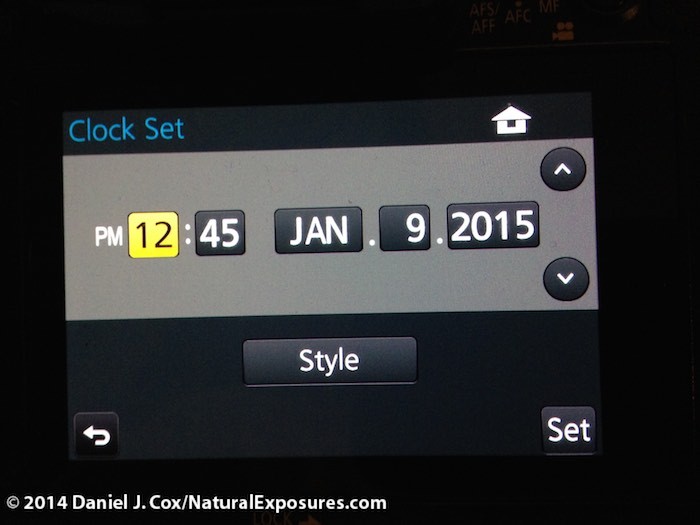
Setting up each cameras clock can make your life so much easier when it comes to editing the footage.
Finally, I check all my 4K capable cameras which include the 2-GH4’s, LX100 and FZ100, to make sure that each one has the newest, fastest cards available. The cards I’m using are the new Panasonic Gold Series, Ultra High Speed (UHS) Speed Class 3 (U3) SD cards. These allow a phenomenally fast 30 Megabytes per second constant minimum write speed to ensure high-quality video recordings. I’ve shot 4K on my SanDisk Extreme Pros but they are only rated to U1 standards, meaning they have the potential to drop frames due to inability to keep up with the amount of data being written. Sandisk, Lexar as well as others are all making the U3 series cards now as well.

The new Gold Series complies with UHS Speed Class 3 (U3) for 4K video support.
January 9, 2015
All of our first trip’s NE Explorers are arriving this evening. Tanya and I arrived two days ago, coming early, as always, to acclimate to the new time zone before having to be on the job, so to speak. Tomorrow we spend the day close to Nairobi where we will visit the David Sheldrick Elephant Orphanage. The orphanage is a place where baby elephants, who have lost their mothers, are reared to be released to the African wilds. Most of them are there due to poaching, a problem that has dramatically increased all over Africa again. That’s a whole different story which we’ll talk about another time.
Obviously there’s not a lot to report on our initial arrival but stay tuned for the next four weeks of great photo opportunities from Kenya.